A security page, without writing one from scratch
A buyer or a reviewer asks whether you have a security page before they ask anything else. Notice Labs hosts one for you, built from a library of standard controls grouped by the question a reviewer is actually asking, with a Last reviewed date that only moves when someone checks it.
From £39 a month. No sales call.
A security page is usually a wiki nobody trusts
Most security pages are a paragraph on the website, a stale PDF, or a page in an internal wiki that hasn't been opened in a year. A reviewer reading it can't tell whether it reflects how the company runs today.
Writing one from nothing means deciding what to cover, choosing wording that doesn't overclaim, and then keeping it current as the setup changes. That's a lot of work for a page most companies only update when a deal depends on it.
How it works
- 01
Pick your controls
Choose from the Notice Labs Controls library and add your own. Each one is standard wording you select and state; Notice Labs doesn't verify them for you.
- 02
They're grouped for you
Controls sit under Access, Data, Foundations, Detection and response, Product security, People and suppliers, and AI: the questions a reviewer actually asks.
- 03
Publish at your domain
The Security tab lives on your trust center, at your own domain if you've set one up, next to your documents and compliance status.
- 04
Mark it reviewed
The Last reviewed date only moves when someone marks the page reviewed, so it can't drift out of date by accident. Visitors can also subscribe to changes with Notify me.
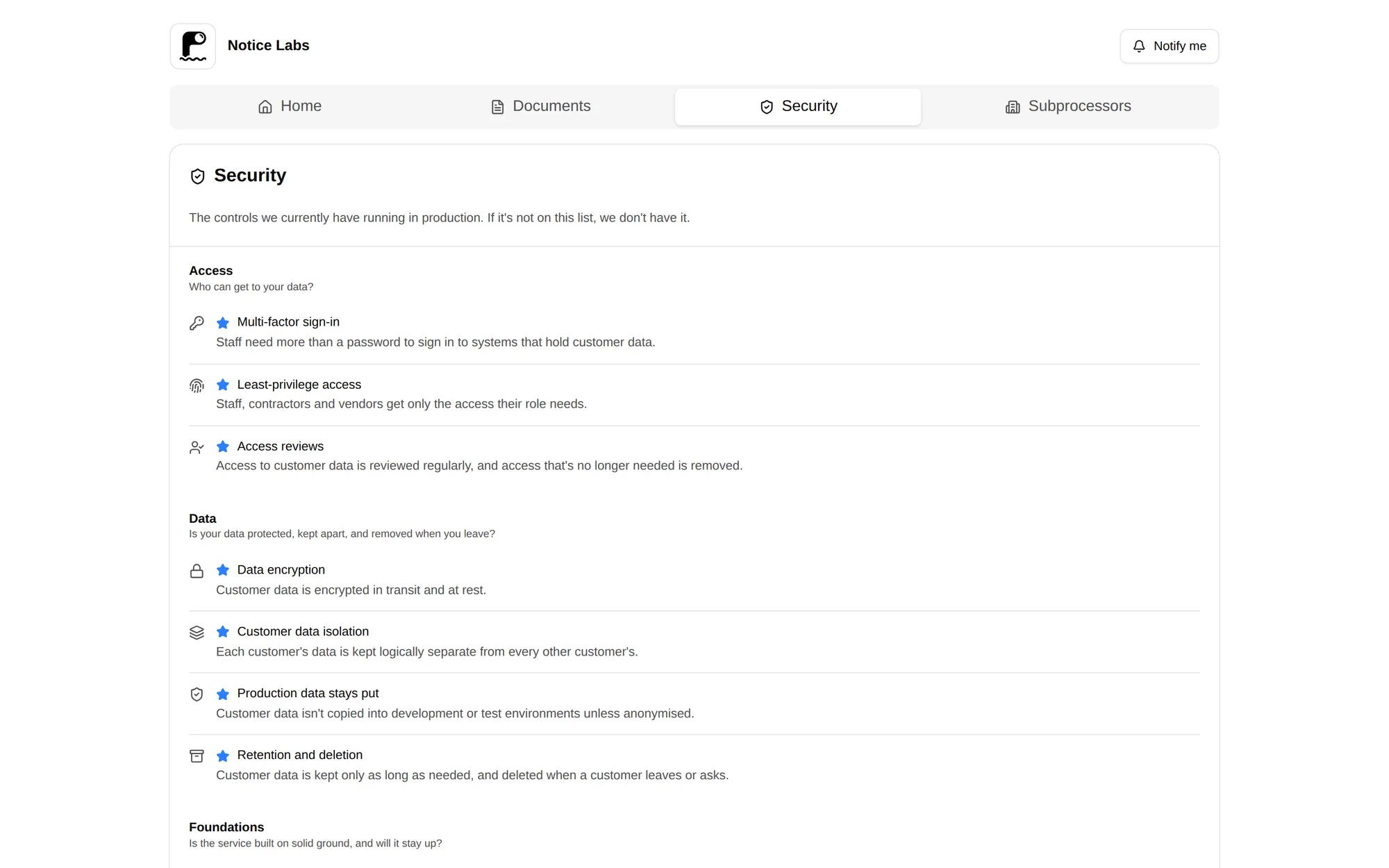
Grouped by the question a reviewer is asking
Rather than a flat list, each control sits under the category a reviewer is actually checking for: who can get to your data, whether it's protected, and whether the service is built on solid ground.
A plain-language description sits with each control, so someone outside security can read it without a glossary.
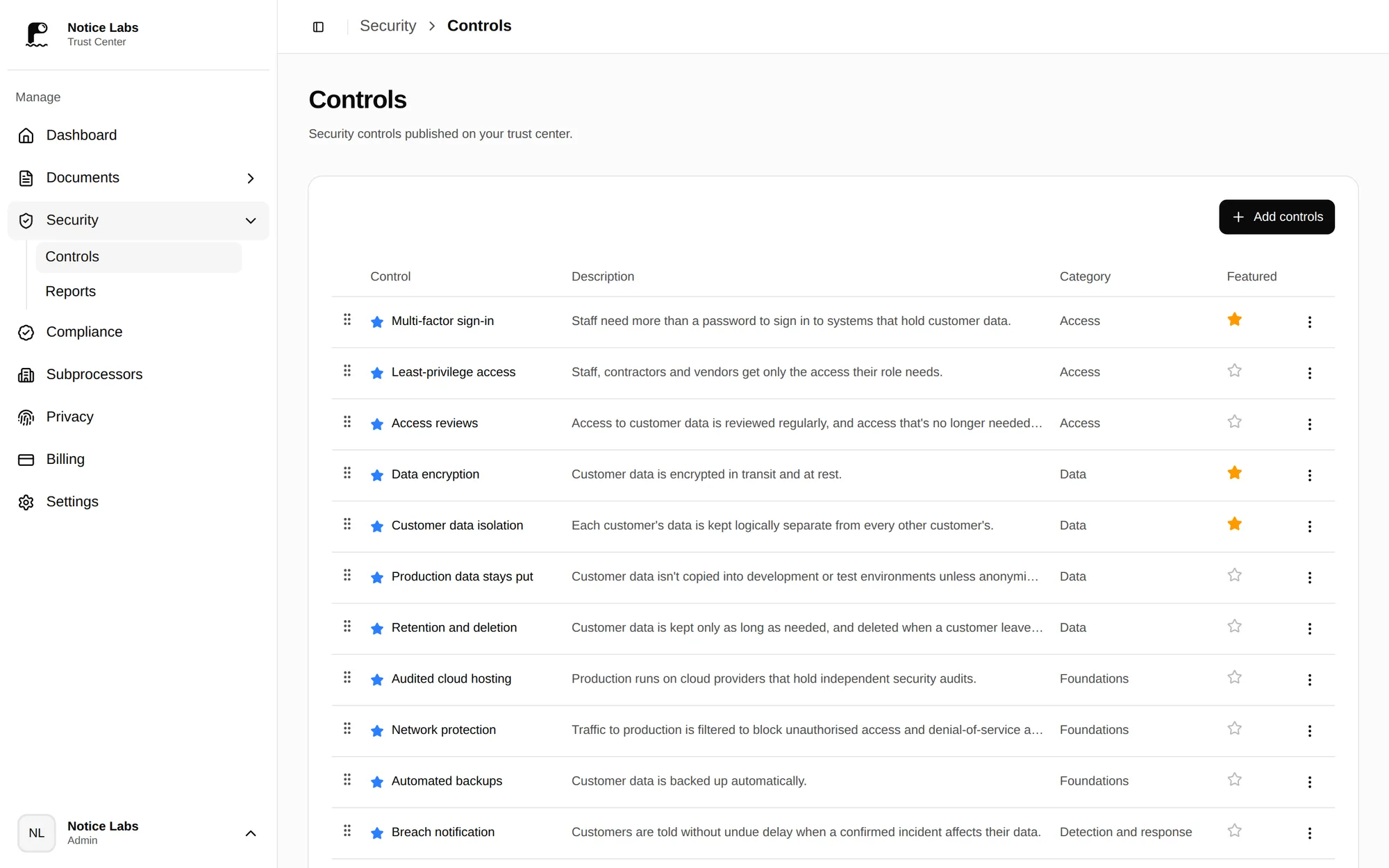
Add and manage controls from one page
The admin lists every published control with its description and category, and a toggle to feature it. Add controls from the library or write your own, and take one down the same way.
Not sure what the page should cover? Read what to put on a security page, a checklist of the sections a reviewer expects.
What it doesn't do
The controls library gives you standard wording to describe what you do; Notice Labs doesn't audit, verify or monitor any of it. A control you turn on is a claim you're making, not a check Notice Labs has run.
It's one tab on your trust center, not a substitute for your compliance certifications or your documents. Those live in their own tabs, next to it.
Questions
Straight answers to what people ask before they set this up.
What goes on a security page?
How you control access, protect data, run your infrastructure, detect and respond to incidents, ship product changes safely, vet people and suppliers, and govern any use of AI. Most pages add compliance status, documents, subprocessors and a way to report a vulnerability.
Do we have to write the wording ourselves?
No. The Notice Labs Controls library gives you standard wording for common controls, grouped by category. You choose which ones apply and state them; you can also add your own where the library doesn't cover something specific to you.
How do we show the page is current?
A Last reviewed date sits on the trust center overview. It only changes when someone marks the page reviewed, so it reflects an actual check rather than the date of the last unrelated edit.
Can we host it at our own domain?
Yes, on Pro and Enterprise. Point a subdomain such as trust.yourcompany.com at Notice Labs and the security page lives there instead of at a noticelabs.co address.
Can we turn sections off?
Yes. Each tab on the trust center, including Security, can be switched off in the admin if you're not ready to publish it.
Can customers subscribe to changes to our security page?
Yes. Notify me lets a visitor confirm an email address and receive a daily update when your controls, documents, compliance status or subprocessors change. You choose which kinds of change are included.
Related reading
Give reviewers a security page you don't have to maintain by hand.
From £39 a month. No sales call.