A vulnerability disclosure form researchers can actually find
Notice Labs puts a vulnerability disclosure form on your trust center, at your own domain. A researcher describes the issue, the affected asset and how to reproduce it. Your security contact gets it by email, and the admin keeps it as a record. A disclosure policy goes beside it, and the free disclosure policy generator below helps you write one.
From £39 a month. No sales call.
Most security reports go to the wrong inbox
A researcher who finds a problem looks for a security page, a security.txt file or a named contact. When there isn't one, they write to support, to sales, or to whoever is listed on LinkedIn. The report sits in a queue built for billing questions, or it never arrives.
Buyers notice the same gap. A vendor security questionnaire almost always asks how you receive vulnerability reports. "Email us" is an answer. A public form that routes to a named contact is a better one.
How it works
- 01
Set your security contact
Choose the address that receives reports. It can be a shared inbox, a person, or an alias that forwards into your ticketing tool.
- 02
Researchers use the form
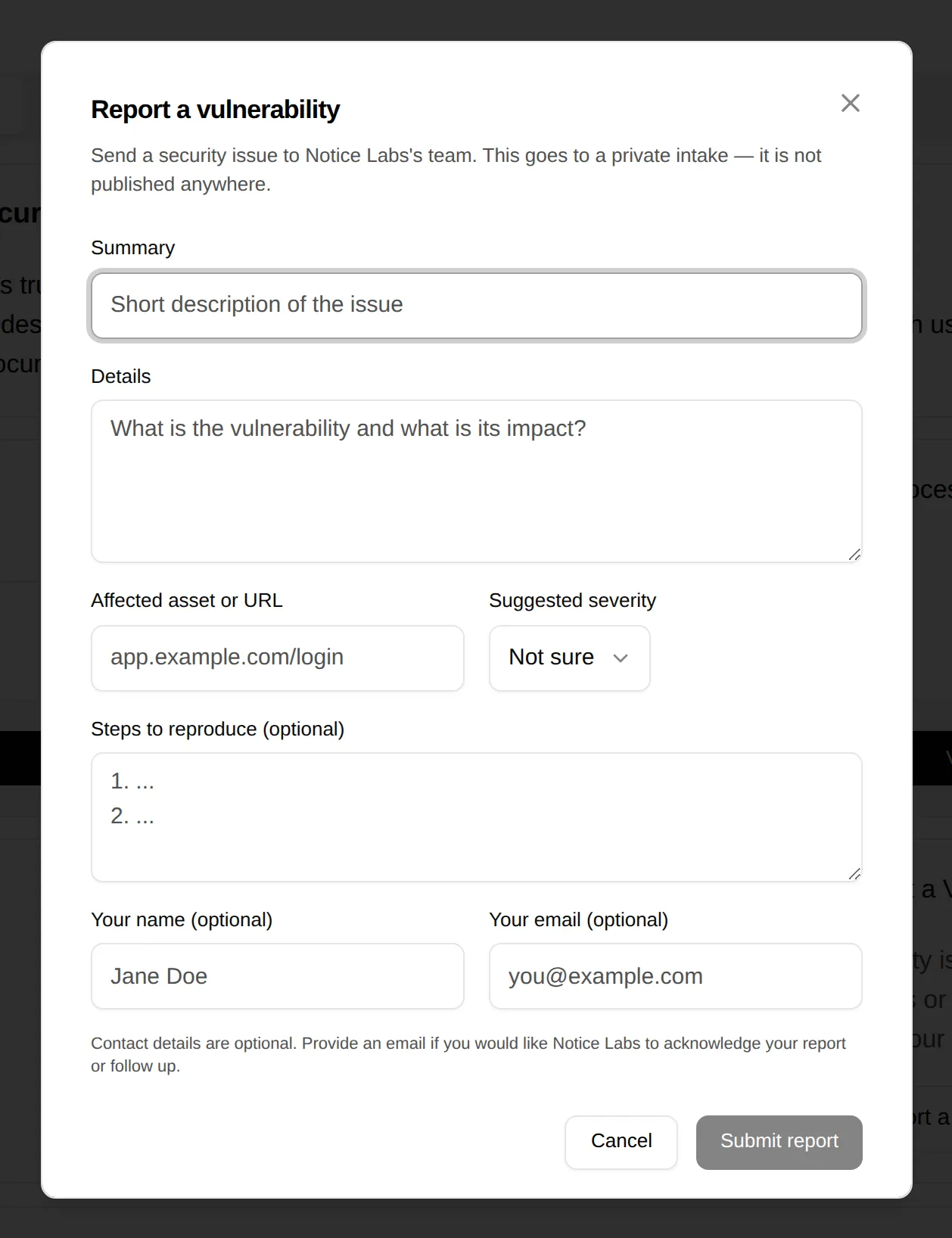
Every trust center has a Report a vulnerability form: a summary, the details, the affected asset, a suggested severity and steps to reproduce. It opens from a link of its own, such as trust.yourcompany.com/#report-vulnerability.
- 03
Both sides hear back
Your contact gets the report by email, with reply-to set to the researcher. A researcher who leaves an email gets an acknowledgement.
- 04
Keep the record
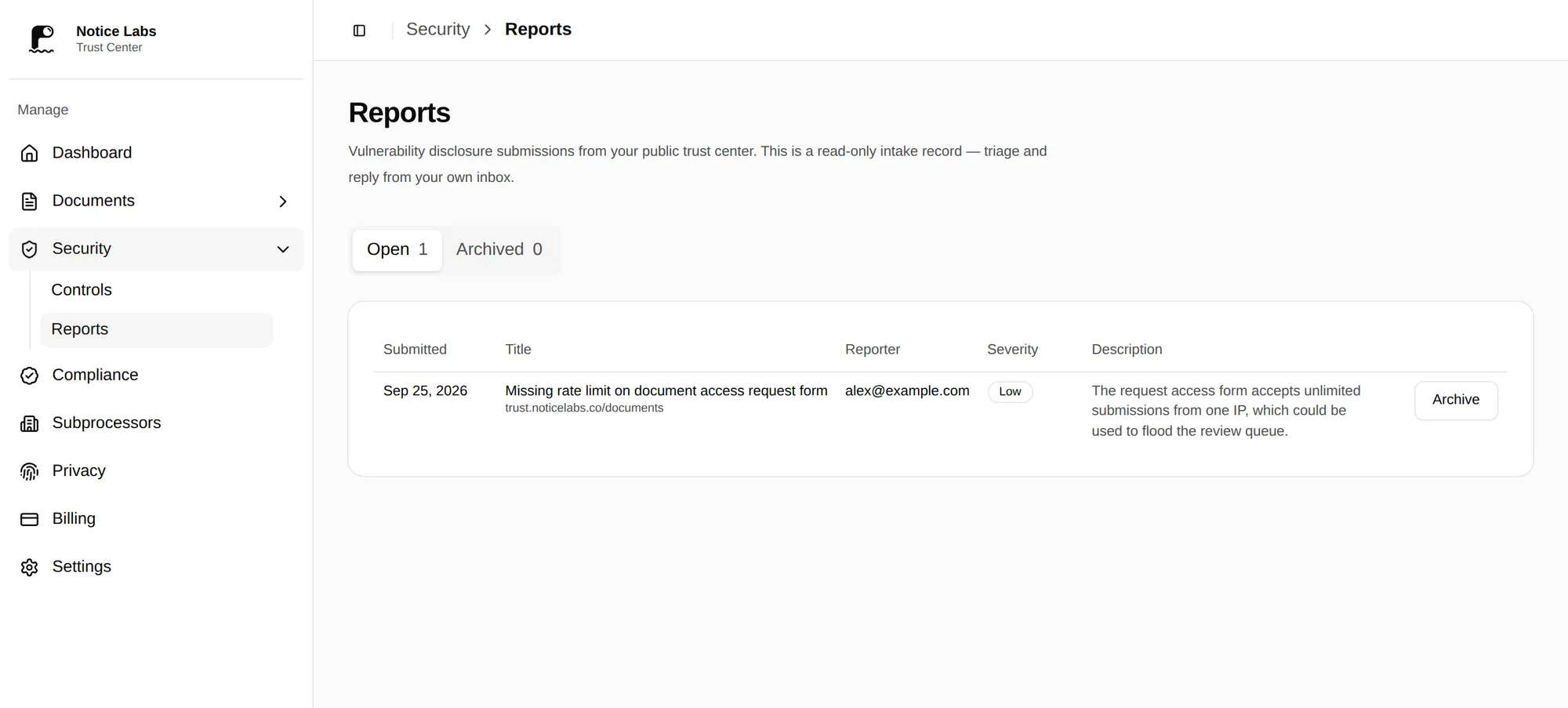
Reports sit in the admin with their severity and date. Archive one once it's handled, and restore it if it comes back.
The fields you need to triage, in one form
The form asks for what a security team needs to reproduce an issue: what it is, where it is, how bad the researcher thinks it is, and the steps. Contact details are optional, so someone can report anonymously if they prefer.
The form is protected from bots, so the queue fills with reports rather than spam.
A list of reports, not a thread of emails
Each report is a row with its submission date and the severity the researcher suggested. Open and archived reports are kept apart, so it's clear what still needs an answer.
Publish a policy and a security.txt around the form
The form collects reports. Two free tools cover the rest of what a researcher looks for.
What it doesn't do
Notice Labs isn't a bug bounty platform. It doesn't pay researchers, run a triage team, or verify reports for you. The severity shown is the one the researcher suggested; your team decides the real one.
It gives you a public, findable way to receive reports and a record of each one. If you later run a paid bounty programme, link to it from your trust center and keep the form for everything else.
Questions
Straight answers to what people ask before they set this up.
Do we need a vulnerability disclosure policy as well as a form?
A short policy helps: what's in scope, how you'll respond, and a safe-harbour statement for good-faith research. Publish it as a document on your trust center, next to the form, so a researcher reads both in one place.
Can researchers report anonymously?
Yes. Name and email are optional. An anonymous report is recorded and sent to your security contact the same way; the researcher just doesn't get an acknowledgement.
Where do reports go?
To the security contact you set in the admin, by email, and into the admin's list of reports. Replying to the email replies to the researcher.
Is this the same as a bug bounty?
No. A bug bounty pays for findings and usually comes with a platform and a triage service. A disclosure form is the baseline every software company should have, bounty or not.
Can we turn the form off?
Yes. Each section of a trust center can be switched off in the admin, the vulnerability report form included.
Do researchers find the form on their own?
A trust center with its report form on, or a security address set, serves a security.txt file at /.well-known/security.txt. It lists the form's link, while the form is on, and your security address, so tools and researchers that look for one find you. The form is also on the trust center itself.
Related reading
Give researchers a form that reaches the right person.
From £39 a month. No sales call.