Vendor security review: answer what the reviewer will ask before they ask
A vendor security review is the check a customer runs on you before they buy. Notice Labs gives you one link to send back: your controls, compliance status, documents and subprocessors on your trust center, so the reviewer reads what's already there before they ask a single question.
From £39 a month. No sales call.
A review usually starts with a spreadsheet
A customer's security team opens a review by sending a questionnaire, or asking for a call, or both. Someone on your side has to find the SOC 2 report, list the subprocessors, describe the controls in place, and answer the same questions the last reviewer asked, in a different format.
Most of that information doesn't change often. What changes is who's asking, and how long they're willing to wait before the deal moves on.
How it works
- 01
Set up your trust center once
Add your controls, mark your compliance status, upload your documents and list your subprocessors. It's the same trust center for every review.
- 02
Send the link
When a review starts, send your trust center address instead of opening a spreadsheet. The reviewer reads it at their own pace. If they want a file, Create in the admin makes a security overview PDF of exactly what your trust center publishes.
- 03
The reviewer requests what's gated
A SOC 2 report or other restricted document is requested from the page, with name, company and email. You approve it from the admin.
- 04
Keep it current
Update a control, a compliance status or the subprocessor list once, and it's current for the next review too.
Everything a reviewer checks, on one page
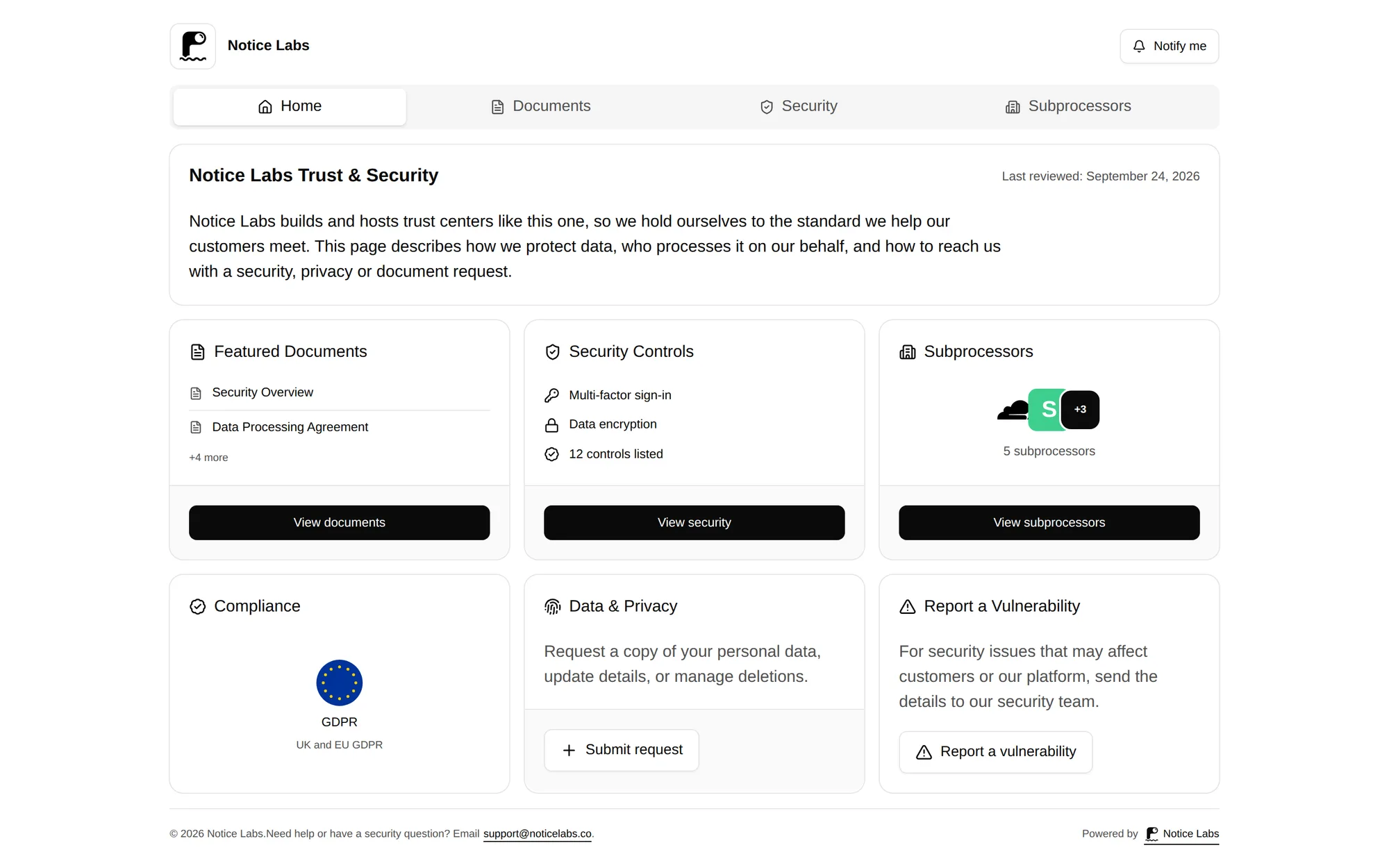
A trust center opens on an overview, with tabs for Documents, Security and Subprocessors. A reviewer moves through the sections a review actually asks about.
Each section can be switched off if it doesn't apply, so the page only shows what you're ready to publish.
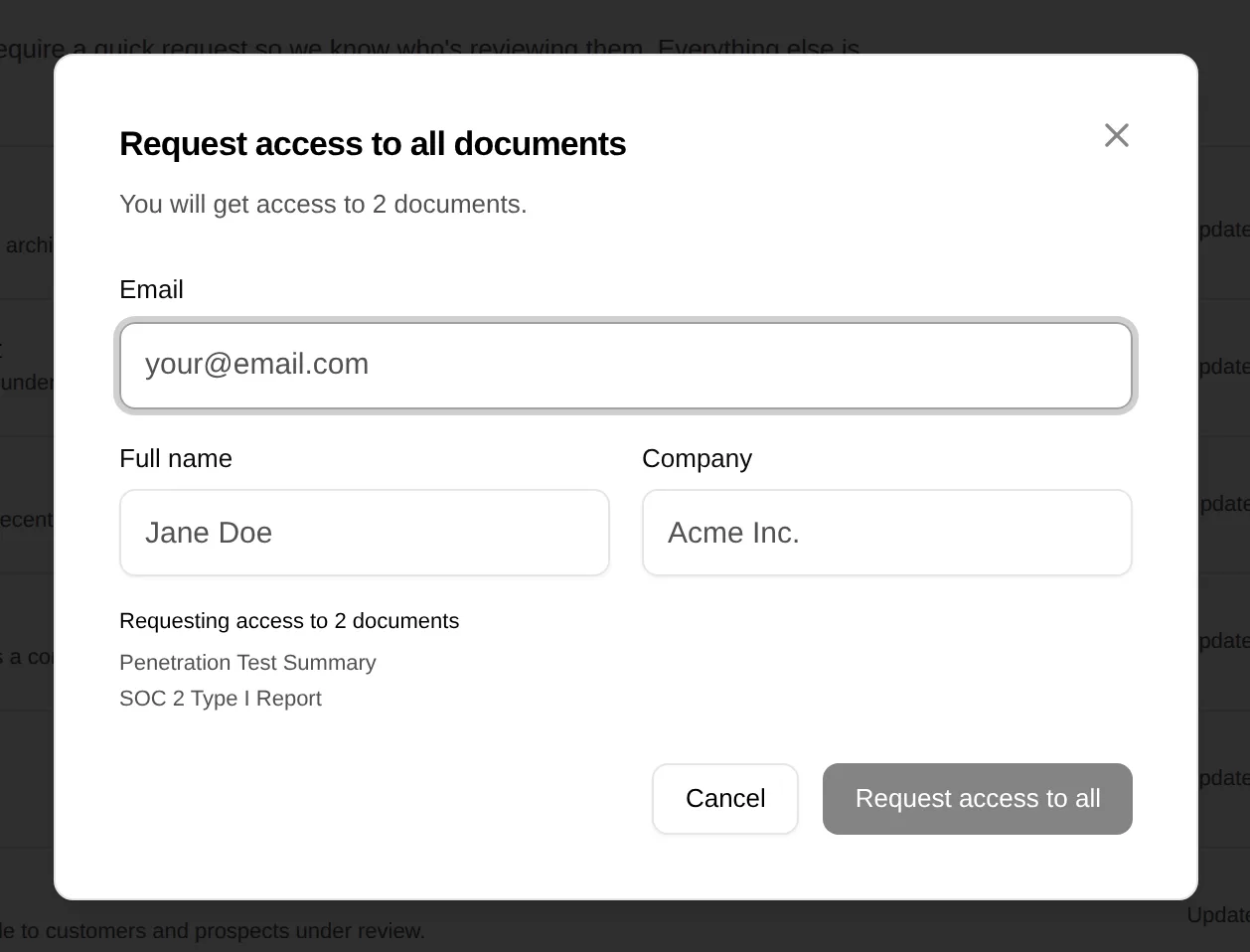
Gated documents without an email thread
A SOC 2 report or other restricted document is requested with a name, company and email, right from the trust center. You approve or deny it in the admin, and the requester gets a link that expires after 30 days.
What's on the page
Six things a reviewer looks for, brought together in one trust center.
- Security controlsThe controls you've put in place, in the reviewer's own terms, grouped by the question they're checking.
- Compliance statusSOC 2, ISO 27001 and the rest, each marked certified, aligned or in progress, so the reviewer isn't guessing.
- Gated documentsYour SOC 2 report and other sensitive documents, released to a named requester instead of emailed to anyone who asks.
- Subprocessor listEvery vendor that touches customer data, with what it does and where it's based, kept up to date.
- Your DPAPublished on the same page, so legal can find it without a separate request.
- Questions for your own vendorsWhen you're the one assessing a supplier, Create generates a blank questionnaire, grouped like the controls on your trust center, for you to send. Notice Labs doesn't send it, track it or collect the answers.
What a reviewer will ask you for
Most reviews ask the same handful of questions. Each one below has a model answer, the evidence a reviewer may ask to see, and what to say if you don't do it yet.
- Is multi-factor authentication enforced?
- Do you review who has access, and how often?
- Is customer data encrypted?
- What happens to our data when we leave?
- Do you take backups, and can you restore them?
- Do you have an incident response plan?
- How do you find and fix vulnerabilities?
- Do you run penetration tests?
- How do you assess your own vendors?
What it doesn't do
Notice Labs doesn't fill in a customer's questionnaire for you. If their process requires their own spreadsheet or portal, someone on your side still answers it; a trust center gives them the source to answer from.
It doesn't audit, verify or certify anything you publish. The controls and compliance status are the ones you set; the trust center presents them, it doesn't check them.
Questions
Straight answers to what people ask before they set this up.
Does this replace filling in a security questionnaire?
No. It gives the reviewer a page to read first, which can shorten the questionnaire or settle the review without one. If a customer still requires their own form, you fill it in, with the trust center as your source.
What if we don't have a SOC 2 report yet?
Publish your controls and compliance status as they stand, mark a framework as in progress if that's accurate, and gate the documents you do have. An honest status tells a reviewer more than a gap does.
Can we keep some documents private until we approve the request?
Yes. Set a document to available on request, and a reviewer gives their name, company and email before they get a link. You approve or deny each request in the admin. Enterprise adds an NDA click-through and passwords.
Who on the reviewer's side actually uses the trust center?
Usually whoever owns the review on their security or procurement team. They read the overview and security sections themselves, and request documents like the SOC 2 report or DPA when they need to share them internally.
Can we send the reviewer a file instead of the link?
Yes. Create generates a security overview PDF from what your trust center shows. It leaves out sections you've switched off and documents that are private.
Can we keep the trust center out of search results?
Yes. Turn search indexing off in the admin. The page still works the same way for anyone you send the link to.
Related reading
Give the next review a page to start from.
From £39 a month. No sales call.